Your cart is currently empty!
Category: 3D Printing & Supplies
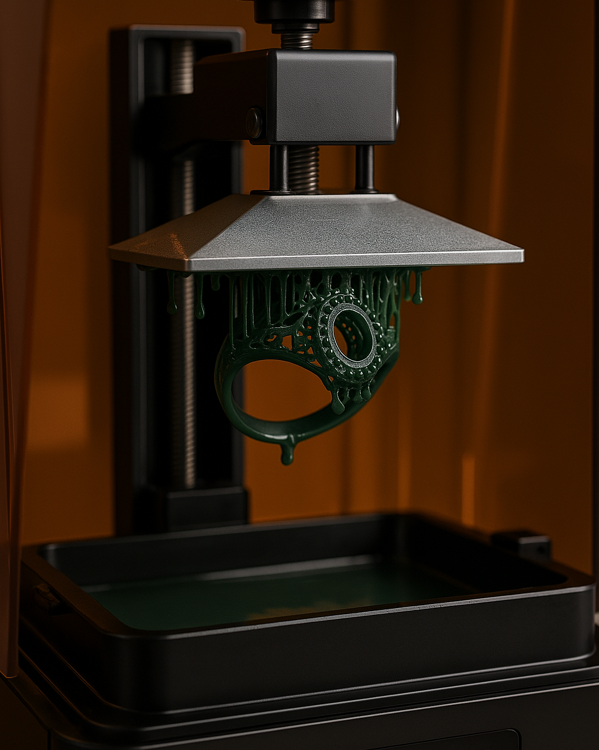
How to 3D Print High-Viscosity Castable Resins
Introduction of 3D printing with high-viscosity castable resins
3D printing with high-viscosity castable resins presents a unique set of challenges and opportunities, particularly within resin-based additive manufacturing processes such as LCD, DLP, and SLA. These specialized resins, which are typically used for investment casting in jewellery, creating dental moulds, and producing high-detail prototypes, are formulated to burn out cleanly without residue, making them ideal for precision applications. However, their thicker consistency (higher viscosity) compared to standard resins makes them more difficult to process.
Unlike low-viscosity resins that flow easily and self-level quickly, high-viscosity castable resins resist movement, making it harder for fresh resin to flow beneath the model during printing. This can lead to print failures, poor layer adhesion, or defects such as bubbles and incomplete curing. Additionally, the increased peel forces during layer separation and the need for optimal resin temperature further complicate the printing process.
To achieve reliable and high-quality prints with these resins, users must fine-tune multiple aspects of the printing workflow. This includes selecting the right build plate surface, adjusting exposure and lift settings, maintaining proper resin temperature, and ensuring proper model orientation and support structures. Moreover, post-processing becomes even more critical to ensure clean burnout and final part accuracy.
This article provides a comprehensive set of practical guidelines, tips, and best practices for successfully 3D printing with high-viscosity castable resins, helping both beginners and experienced users improve print consistency and quality in demanding applications.
- Choose the Right Build Plate Surface
When printing with high-viscosity castable resins, one of the most critical factors affecting print success is the adhesion of the first few layers to the build plate. These resins, due to their thick consistency, do not flow or spread as easily as low-viscosity materials. As a result, the initial layers may not fully wet or bond to a smooth build plate surface, leading to print detachment or warping early in the process.
- Grooved and Perforated Build Plates: Enhancing Mechanical Adhesion
Using grooved or perforated build plates significantly improves the mechanical interlocking between the resin and the surface. These features provide physical “anchors” that allow the cured resin to grip onto the build platform more securely. The grooves and holes act as cavities into which the resin can flow and harden, creating a firm hold that is less reliant on chemical adhesion alone.
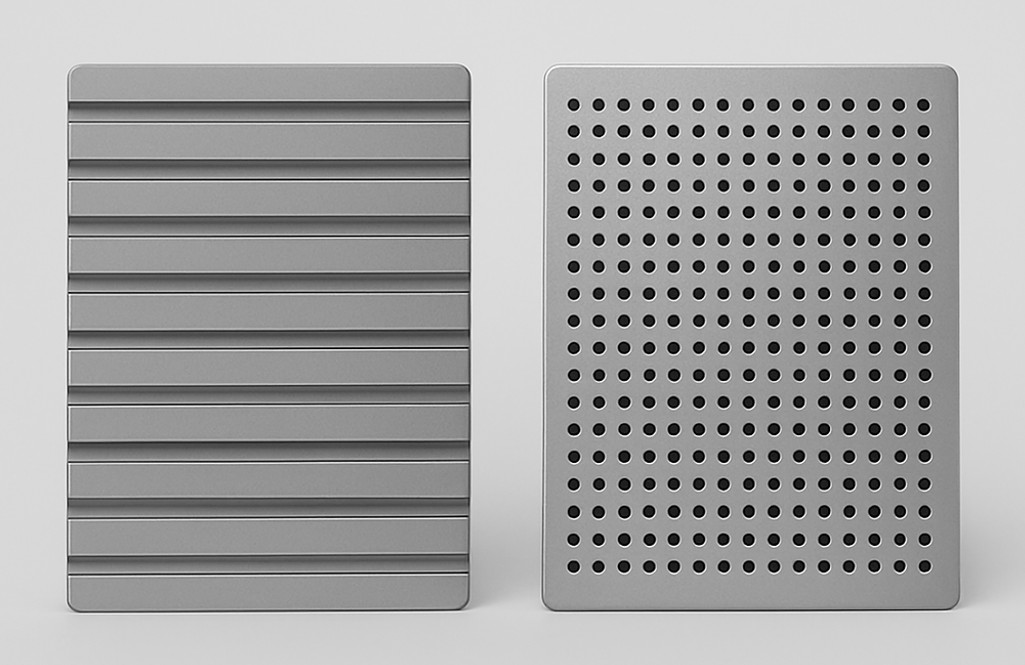
This mechanical grip is particularly beneficial during the peel process in bottom-up resin printing technologies like LCD and DLP, where each new layer must be pulled away from the transparent FEP film. High-viscosity resins can create strong suction forces during this peel step, which may cause parts to detach if the bond to the build plate is insufficient. Grooved and perforated surfaces reduce the likelihood of such failures by stabilizing the print through better anchoring.
- Surface Texture and Geometry Considerations
While grooved and perforated plates offer better adhesion, their design must be balanced:
- Grooves should not be too deep, as excessive texture can make part removal difficult and potentially damage delicate castable prints.
- Perforation patterns (e.g., mesh or honeycomb structures) should be fine enough to enhance adhesion but not so aggressive that they imprint visibly on the printed object.
- Surfaces with fine diagonal or crosshatch grooves offer a good compromise, increasing surface area and grip without compromising part quality.
- Avoid Smooth Surfaces
Build plates with mirror finishes or overly smooth coatings are generally not suitable for high-viscosity castable resins. These surfaces may cause the initial layers to slip or fail to bond, especially if the resin is thick and slow-moving. Even if the print starts correctly, weak adhesion can lead to failures mid-print when the part is under stress during layer separation.
- Maintenance and Cleanliness
Regardless of texture, a build plate must always be clean and properly levelled:
- Resin residue, cured particles, or dust can interfere with adhesion.
- Misalignment can cause uneven layer curing, leading to detachment at weaker spots.
Regular cleaning with isopropyl alcohol (IPA) and gentle sanding (if applicable) can help maintain surface performance over time.
-
Optimize Layer Settings for castable resins
High-viscosity castable resins require careful tuning of printing parameters to ensure successful curing, proper layer formation, and stable part adhesion. Unlike low-viscosity resins that self-level quickly and require minimal tuning, high-viscosity resins behave more sluggishly, making timing, curing energy, and movement settings far more critical. Here are the most important layer-related parameters to optimize:

- Bottom Exposure Time
The bottom exposure time defines how long the printer cures the first few layers of the print. With thick resins, light penetration through the material is more difficult due to:
- Reduced optical clarity,
- Slower flow that prevents even spreading,
- Potential pigment load in specialized castable formulas (such as red or green castable resins).
To compensate:
- Increase bottom exposure time significantly (often 50–100% more than for standard resins).
- Typical values may range from 30 to 60 seconds, depending on the resin and printer’s light source.
- This ensures that the resin cures deeply and bonds tightly to the build plate, forming a strong foundation.
- Number of Bottom Layers
The number of bottom layers also affects overall adhesion and strength at the base:
- For high-viscosity resins, increasing the number of bottom layers to 6–10 (or even more for tall or heavy models) is recommended.
- Each of these layers helps gradually build a robust base that can withstand the peeling forces during printing.
More bottom layers:
- Compensate for any minor inconsistencies in curing caused by the resin’s thickness,
- Distribute stress more evenly, reducing the likelihood of part detachment in early layers.
- Normal Exposure Time
Once the base is formed, normal exposure time (for all remaining layers) must be adjusted appropriately:
- High-viscosity resins often require 10–30% longer exposure per layer than lower-viscosity alternatives.
- A good starting point is 6–9 seconds per layer, depending on resin opacity, printer LCD power, and layer height.
Tip: Test exposure time using validation prints (e.g., exposure test models or calibration rings) to dial in the ideal settings before printing complex geometries.
- Lift Speed and Lift Height
Because of the resin’s thickness, the time it takes for fresh resin to flow under the model between layers is increased.
To allow proper resin replenishment:
- Reduce lift speed to minimize suction forces and avoid mechanical shock to the model.
- Increase lift height to create enough vertical clearance for resin to flow evenly.
- Add a sufficient delay after lifting (wait before next exposure) to allow the resin to settle back into place before the next layer begins.
Typical settings for high-viscosity resins:
- Lift speed: 30–60 mm/min
- Lift height: 5–8 mm
- Wait time after lift: 2–5 seconds
These settings prevent the formation of bubbles, voids, and underexposed areas due to poor resin flow.
- Layer Thickness (Z-Height)
Although high-resolution prints often use 0.025–0.05 mm layers, printing castable resins at such thin layers can be problematic when viscosity is high. Thicker layers may be preferable:
- Use 0.05 mm or 0.1 mm layer height for better flow and more reliable results.
- Thicker layers reduce the number of peel steps, minimizing stress on the model and printer.
- Temperature Control
Controlling the temperature of the printing environment and the resin itself plays a critical role in the success of 3D printing with high-viscosity castable resins. These resins tend to be thick and slow-moving at room temperature, which can hinder proper layer formation, delay resin flow, and increase the risk of printing defects such as incomplete curing, bubbles, and failed supports.

Proper temperature management significantly improves resin flow, layer adhesion, and overall print reliability. Here’s how to effectively implement it:
- Why Temperature Matters for High-Viscosity Resins
High-viscosity resins exhibit non-Newtonian fluid behaviour, meaning their flow properties change under temperature and stress. At lower temperatures, they:
- Flow more slowly,
- Take longer to refill between layers,
- Exhibit increased internal resistance (drag), and
- Tend to trap bubbles or form uneven layers.
At slightly elevated temperatures, their viscosity decreases, allowing:
- Easier resin movement beneath the print,
- Better surface levelling between layers,
- Improved curing uniformity,
- Enhanced resolution and surface finish.
This is especially important in resins designed for investment casting (e.g., wax-filled or pigmented castable resins), where pigment density and filler particles further thicken the material.
- Ideal Temperature Range
Most high-viscosity castable resins respond well to mild heating:
- The recommended temperature range is 30°C to 35°C (86°F to 95°F).
- At this temperature, resin flows more freely without altering its chemical stability or curing behaviour.
Some manufacturers may specify optimal temperature ranges in their datasheets. Always refer to the resin-specific documentation to avoid issues related to material degradation.
- How to Maintain Resin Temperature
Depending on your printer setup and environment, you can maintain optimal temperature in several ways:
- Built-in Resin Heater (if available)
- Some advanced printers (e.g., Prosen Sonic Mighty 8K, Anycubic Photon M5s) come with built-in resin heating systems.
- Enable the heater through the printer’s touchscreen menu and allow the resin to preheat for 10–15 minutes before starting the print.
- External Resin Heating Pads or Sleeves
- Flexible silicone heater wraps designed for resin vats or bottles can gently raise the temperature.
- Use a digital temperature controller to prevent overheating.
- Avoid heating directly with open heat sources (e.g., hairdryers or heat guns), which can cause uneven heating or thermal stress.
- Heated Enclosure or Warm Room
- Print in a temperature-controlled environment (ideally 25°C to 30°C).
- Enclose your printer in an insulated box or tent to retain warmth.
- Use a small ceramic heater or incubator-style heating element with a thermostat to keep the enclosure warm and stable.
- Warming Resin Before Use
Even before pouring the resin into the vat:
- Pre-warm the resin bottle by placing it in warm water (not boiling) for 10–15 minutes.
- Gently rotate or shake the bottle (after warming) to ensure even temperature distribution and proper mixing of pigments or additives.
Avoid excessive shaking, which can introduce air bubbles. Instead, invert the bottle slowly or use a resin mixing wand.
- Avoiding Overheating
While mild heating improves resin flow, overheating must be avoided. Excessive temperatures (above 40–45°C) can:
- Cause the resin to start prematurely curing inside the vat,
- Degrade its chemical stability,
- Alter mechanical properties of the printed part,
- Create excessive odor or fumes.
Use digital thermometers or infrared sensors to monitor resin temperature regularly. If you notice thickened gel-like consistency or clumping, stop the print and inspect the resin for signs of thermal damage.
- Resin Stirring and Handling
High-viscosity castable resins, especially those formulated for investment casting or dental applications, contain various additives—such as pigments, fillers, and waxes—that can settle or separate over time. Proper stirring and handling of the resin are essential for consistent print quality, dimensional accuracy, and reliable burnout performance.
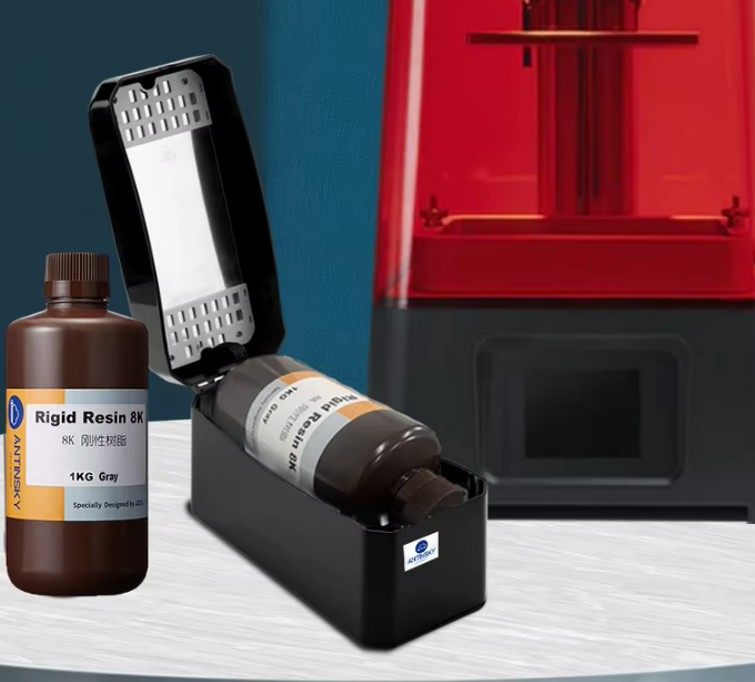
Failing to mix the resin properly can result in:
- Uneven exposure and curing,
- Weak or brittle prints,
- Inconsistent colour or surface finish,
- Failed supports or detached features, and
- Residue during casting due to pigment clumping.
Here’s how to handle and prepare the resin correctly:
- Stirring Before Each Print Session
Always stir the resin thoroughly before each print, whether you’re using a fresh bottle or reusing resin from the vat. This ensures uniform dispersion of:
- Suspended particles (such as wax content in castable resins),
- Pigments (which affect curing and appearance), and
- Photoinitiators (which control how well the resin cures under UV light).
Best practices:
- Use a plastic or silicone spatula or a resin-safe stirrer.
- Stir gently but thoroughly for 2–5 minutes, reaching the bottom of the container or vat.
- Avoid vigorous shaking that introduces bubbles, especially for high-viscosity resins that trap air easily.
- Reusing Resin from the Vat
If the resin has been sitting in the printer’s vat for several hours or days:
- Visually inspect it for signs of pigment separation, surface film, or hardened particles.
- Gently stir the resin in the vat using a soft tool that won’t damage the FEP film.
- For longer idle times (e.g., overnight or longer), it’s recommended to filter the resin before reuse to ensure no cured bits or debris are present.
- Filtering the Resin
Filtering is especially important after failed prints or prolonged storage:
- Use a resin filter funnel or fine mesh paint strainer (100–200 microns).
- Pour the resin back into the original bottle or another clean container.
- Remove any hardened particles, dust, or skin formed on the resin surface.
This step prevents:
- Contamination of the vat or LCD screen,
- Clouding or scratching of the FEP film,
- Curing inconsistencies in future prints.
- Storage and Shelf Life
High-viscosity resins are more prone to separation over time, so proper storage is vital:
- Store resin bottles in a cool, dark, and dry place, ideally between 15°C and 25°C.
- Keep bottles sealed tightly when not in use to prevent moisture absorption and premature polymerization.
- Shake or stir bottles every few weeks if unused for extended periods.
Always check the expiration date and resin condition before printing. An expired or improperly stored resin can yield poor results even with correct settings.
- Tools for Efficient Handling
To streamline handling and reduce human error:
- Use a magnetic stirrer for consistent mixing, especially for larger resin bottles.
- Invest in resin mixing wands or drill-mounted stirrers with low-speed control.
- Keep a set of dedicated resin tools for each type or colour to avoid cross-contamination.
- Use Proper Supports
In resin-based 3D printing, support structures are essential for holding parts in place during the print, especially for overhangs, bridges, and delicate features. When using high-viscosity castable resins, the importance of well-designed supports increases significantly due to the mechanical stresses introduced during layer separation (peeling) and the resin’s resistance to flow.
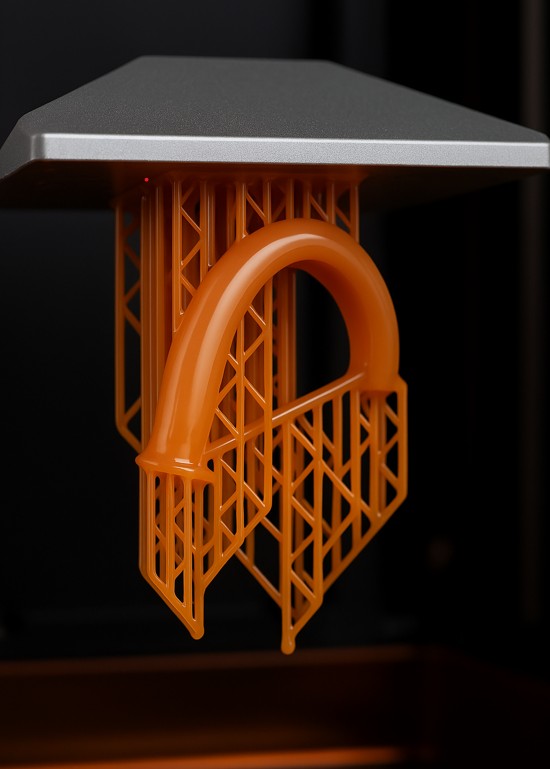
These resins tend to resist motion and exert greater suction forces during each peel cycle, especially in bottom-up systems like LCD and DLP printers. If the supports are weak, under-sized, or improperly placed, parts may shift, detach, or warp, leading to complete print failure.
Here’s how to design and implement optimal supports for reliable results:
- Stronger, Thicker Support Beams
High-viscosity resins create more resistance during printing. To counter this:
- Use thicker support shafts (e.g., 0.5–1.0 mm or more depending on model size).
- Increase the tip size and contact depth to provide stronger attachment points to the model.
- Select heavy support presets in slicers (e.g., Lychee, ChiTuBox, Voxeldance Tango) rather than lightweight or minimal profiles.
These measures improve the stability of delicate features and reduce the risk of “floating islands” or mid-print failures caused by insufficient support strength.
- Anchor Points and Support Density
For heavy or tall models:
- Increase the density of supports, especially in the first 1–2 cm of the print where peeling forces are highest.
- Ensure each island or separated feature has at least 2–3 support connections.
- Use base platforms or rafts to distribute forces and prevent individual supports from detaching during printing.
You can also use bracing structures (cross-links between support beams) to strengthen tall or fragile supports and reduce vibration during the Z-lift.
- Optimal Model Orientation
Positioning the model at an angle plays a key role in improving print success with high-viscosity resins:
- Tilt the model between 30° and 45° on the X or Y axis (or both).
- Angled positioning:
-
-
- Minimizes the cross-sectional area exposed per layer, reducing peel forces.
- Helps resin flow back beneath the part more easily after each lift.
- Encourages better support coverage under overhangs and critical features.
-
Models oriented flat or vertically may require more aggressive supports and are more prone to warping or failure when printed with thick resins.
- Contact Point Considerations
Castable resin prints are often small and highly detailed, meaning that support contact points must be carefully balanced:
- Too large, and they may damage the surface or require excessive post-processing.
- Too small, and the model may break off during printing due to the added force needed to separate each layer.
Use medium to heavy contact points (e.g., 0.3–0.6 mm tips) and place them in non-critical or hidden areas of the model when possible. Some slicers offer automatic support painting to make this process more efficient.
- Post-Processing and Support Removal
Supports printed with high-viscosity resins tend to be more rigid and may cure harder than standard resins. Therefore:
- Remove supports soon after printing, before full post-curing.
- Use flush cutters or specialized support-removal tools.
- If supports are difficult to remove, soak the print briefly in warm isopropyl alcohol (IPA) to soften them slightly.
Careful removal prevents surface damage, especially in models destined for investment casting, where surface quality directly affects the final mould.
- Resin Drainage and Venting
When printing hollow or partially enclosed models using high-viscosity castable resins, proper drainage and venting are essential. These resins are thicker and flow more slowly than standard resins, making them particularly prone to trapping uncured resin inside cavities or creating strong suction forces during layer separation.
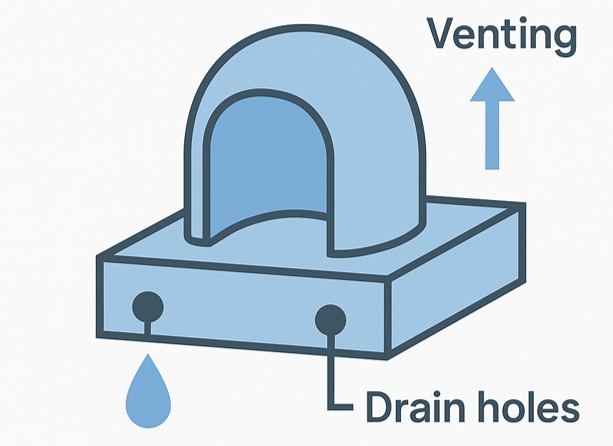
If the resin cannot escape or air cannot enter enclosed areas during the print, the result can be:
- Internal resin buildup that never cures,
- Vacuum suction effects that cause parts to tear or detach mid-print,
- Cracks, warping, or blowouts during post-curing or casting due to pressure buildup inside the part.
To prevent these issues, careful design for resin flow and air exchange is necessary.
- Why Drainage and Venting Are Critical for High-Viscosity Resins
High-viscosity resins do not self-level or escape confined spaces easily. During printing, especially in inverted (bottom-up) printers:
- As each layer is lifted from the FEP film, a vacuum can form inside hollow sections if resin has no way to escape.
- With thicker resin, this vacuum is stronger and takes longer to break, resulting in layer shifting, suction lines, or complete print failure.
- Uncured resin that remains trapped inside cavities can leak, affect part weight, interfere with casting, or cause cracking during curing or burnout.
- How to Design Drain Holes
If your model is hollow or contains internal cavities:
- Add drain holes at the lowest points of the model (based on its printing orientation) to allow excess resin to escape.
- Use at least 2 holes (entry and exit) so resin can flow out and air can flow in.
- Recommended hole sizes:
-
-
- Minimum 2.0 mm diameter for standard use,
- 3–5 mm for thick resin or larger volumes.
-
Examples of good drain hole placement:
- Inside ring bands (bottom of the shank),
- Bottoms of hollow figurines or jewellery parts,
- Inside tubes, channels, or tanks.
You can later plug or repair these holes post-processing if needed.
- Venting to Avoid Pressure Buildup
In addition to drainage, vent holes are needed to:
- Prevent air pockets from forming in sealed chambers,
- Avoid internal pressure during the peel process or during UV post-curing and burnout stages in casting.
Without venting, air cannot displace the draining resin, resulting in:
- Incomplete drainage,
- Resin trapping,
- Deformation of thin walls,
- Internal cracking due to expanding gas in the burnout kiln.
Position vent holes at the topmost points of the model (based on print orientation), opposite the drain holes. These allow air to enter as resin flows out.
- Slicer Tools and Model Checks
Most slicer software doesn’t automatically warn you about unvented cavities, so it’s up to the designer to:
- Run hollow model detection in mesh repair tools (e.g., Meshmixer, Netfabb),
- Check for “watertight” geometry that may unintentionally seal off inner areas,
- Simulate print orientation to identify resin traps.
- Alternative Methods for Internal Support and Drainage
For complex internal geometries:
- Use lightweight lattice infills instead of fully hollow interiors. These allow resin to drain more easily while maintaining part strength.
- Consider removable plug-in vent holes, where temporary stoppers can be inserted after printing and cleaning.
- Post-Processing Tips
Post-processing is a crucial phase in the resin 3D printing workflow—particularly when using high-viscosity castable resins, which often leave behind sticky residues or internal uncured resin due to their thick, pigment-rich compositions. These resins are typically used in demanding applications like jewellery casting, dental models, and high-precision prototyping, where surface quality and dimensional accuracy are paramount.

Proper post-processing ensures:
- Full removal of uncured resin,
- Cleaner surfaces,
- Better mechanical properties, and
- Improved burnout performance in casting.
Here are the essential steps to follow:
- Initial Rinse: Removing Surface Resin
Immediately after the print is removed from the build plate:
- Rinse it thoroughly in 95–99% isopropyl alcohol (IPA), denatured alcohol, or resin-specific cleaners like Elegoo Resin Cleaner or Mean Green (if compatible).
- Use a two-stage rinse:
- First container: removes the bulk of uncured resin.
- Second container: provides a cleaner wash and prevents recontamination.
For best results:
- Gently agitate the part in the bath using a soft brush or by swirling it in the alcohol.
- Avoid prolonged soaking (especially more than 5–10 minutes), which can cause softening or surface swelling in some delicate castable resins.
- Ultrasonic Cleaning (Optional but Recommended)
For parts with fine details, deep crevices, or highly pigmented resins, using an ultrasonic cleaner is highly recommended:
- Place the part in a container filled with IPA or resin cleaner and submerge it in the ultrasonic tank (filled with water).
- Run the ultrasonic cycle for 3–5 minutes but avoid overly long sessions which could damage fragile parts.
Ultrasonic waves help:
- Dislodge resin from small holes and surface textures,
- Ensure uniform cleaning without manual scrubbing,
- Reduce risk of residue that can affect curing or casting.
- Drying the Part
After cleaning:
- Air-dry the part or use compressed air to blow out residual IPA, especially from holes, undercuts, or internal cavities.
- Ensure that no trapped alcohol remains inside hollow models, as it can cause cracking or bubbling during UV curing.
Allow the part to dry completely before moving to the curing stage.
- Post-Curing Under UV Light
Post-curing strengthens the printed part and completes the polymerization process:
- Use a UV curing chamber or high-power UV lamp (405 nm wavelength is standard for most castable resins).
- Cure time depends on resin type, part geometry, and UV intensity—typically 5–30 minutes per side.
- Rotate or reposition the part during curing to ensure all surfaces are evenly exposed.
For castable resins, over-curing can sometimes lead to excessive brittleness, while under-curing may leave the part too soft and affect burnout. Always follow the manufacturer’s specific instructions.
Tip: Use a turntable inside the curing chamber for better exposure and consider curing parts submerged in water or glycerine (if the resin allows) to reduce oxygen inhibition and improve surface curing.
- Support Removal (Before or After Curing?)
- For brittle castable resins, it’s often best to remove supports before post-curing, while the material is still slightly flexible.
- Use flush cutters or precision snips, and sand or file contact points as needed.
- If supports are hard to remove or risk damaging the model, partially cure the part first, remove supports, and then finish the curing cycle.
- Final Surface Preparation (Optional for Casting)
Depending on the application:
- For direct casting, leave the surface as-is to preserve dimensional fidelity.
- For visual models, you may lightly sand, polish, or prime the surface.
- Use UV-blocking primer to prevent over-curing if the model will be exposed to sunlight before casting.
Conclusion
Successfully printing with high-viscosity castable resins requires a combination of optimized hardware, software, and material handling techniques. From selecting the right build plate surface to adjusting exposure settings and ensuring proper temperature control, each step contributes to higher print reliability and better final quality. With the right approach, even the thickest resins can produce precise, high-performance results.
Precision Matters: How 3D Printer Filament Diameter Accuracy Affects Quality & Strength
Introduction
One of the critical parameters influencing the overal quality and mechanical properties of 3d printed products is the accuracy of the filament diameter used during the printing process. Even slight variations in diameter can lead to significant defects, affecting both aesthetics and functionality. This article explores the significance of filament diameter accuracy in ensuring superior surface quality and structural strength in 3D-printed models, along with best practices for maintaining precision.
1. Understanding Filament Diameter Accuracy in 3D Printing
1.1 Definition of Filament Diameter Accuracy
3D printing filament diameter accuracy refers to the consistency of filament diameter across its length. It ensures uniform material flow during extrusion, reducing variability in printed models. This parameter is crucial for maintaining print quality, especially in precision engineering applications.
1.2 Measurement and Tolerances
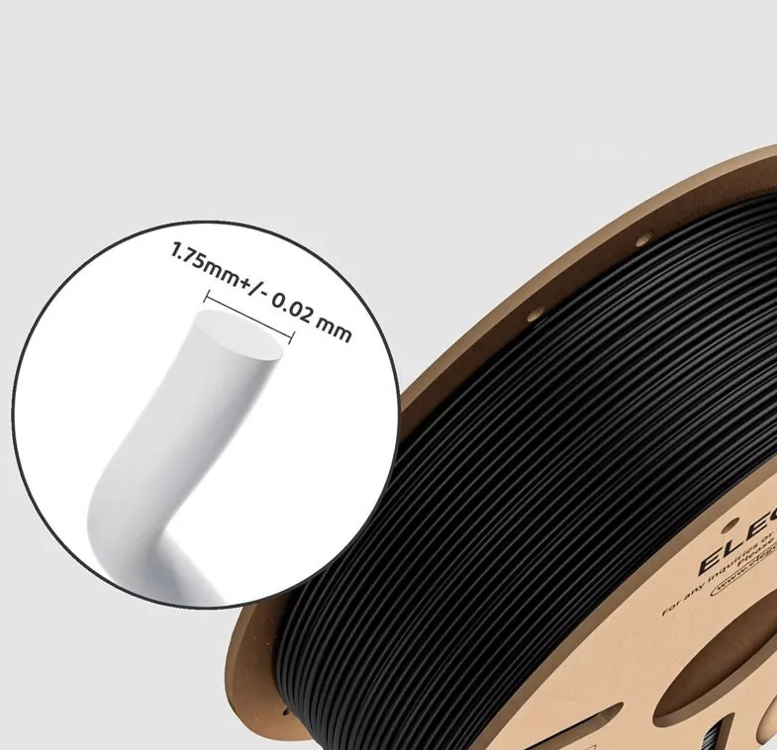
Filament manufacturers specify diameter tolerances, typically ±0.02 mm to ±0.05mm for high-quality filaments. Inconsistencies beyond this threshold can result in unreliable extrusion, affecting print accuracy and durability. Measuring tools like digital callipers and laser micrometres help in assessing these tolerances, ensuring that only materials within the accepted range are used.
1.3 The Role of Nozzle Diameter
The nozzle diameter significantly influences how filament variations impact print quality. A larger nozzle may be more forgiving, while smaller nozzles used for high-detail prints require highly consistent filament diameters to prevent blockages and inconsistent extrusion.
2. Impact of Diameter Accuracy on Surface Quality
2.1 Layer Consistency and Print Artifacts
Inconsistent filament diameter leads to fluctuations in extrusion, causing under-extrusion (gaps and weak layers) or over-extrusion (bulging and surface roughness). These artifacts impact the aesthetic and functional quality of prints, often requiring additional post-processing to correct surface defects.
2.2 Surface Smoothness and Precision
Precise diameter control ensures even layer deposition, leading to smoother surfaces with minimal post-processing requirements. This is particularly crucial for models requiring fine details and high-resolution printing, such as detailed prototypes, dental models, and figurines.
2.3 Reduction of Stringing and Oozing
Filament diameter inconsistencies affect extrusion rates, contributing to excessive oozing and stringing, which degrade the overall finish of the model. This is especially problematic in materials like TPU and PETG, where precise extrusion control is necessary to minimize artifacts.
2.4 Effects on Support Structures
When filament diameter accuracy fluctuates, support structures can become weak or overly rigid, making them difficult to remove cleanly. This can damage delicate models, necessitating careful tuning of filament consistency to maintain the balance between strength and removability.
3. Influence of Filament Diameter Accuracy on Strength and Mechanical Properties
3.1 Interlayer Bonding and Structural Integrity
Variations in filament diameter impact material flow and layer adhesion. Poor bonding weakens structural integrity, making prints susceptible to delamination and failure under load. Proper interlayer adhesion is crucial for applications requiring durable and functional components, such as automotive parts and medical devices.
3.2 Uniformity in Stress Distribution
Consistent extrusion leads to even stress distribution within the printed model, enhancing its mechanical performance. In contrast, fluctuations in material feed create weak points prone to cracking under mechanical stress. This is particularly relevant for engineering applications where tensile and compressive forces must be evenly distributed.
3.3 Impact on Load-Bearing Capacity
For load-bearing components, precision in filament diameter ensures accurate infill density and wall thickness, directly affecting strength and durability. High-performance filaments such as carbon-fibre-reinforced PLA and nylon rely heavily on accurate filament diameter to maintain mechanical integrity.
3.4 Effect on Functional Prints and Moving Parts
Functional prints, such as gears, bearings, and articulated parts, require precise material flow for tight tolerances. Filament diameter inaccuracies can lead to poor fitment, excessive friction, or mechanical failure in moving parts.
4. Factors Influencing Diameter Accuracy and How to Control Them
4.1 Filament Manufacturing Quality
High-quality filaments undergo rigorous testing for consistent diameter control. Choosing reputable suppliers reduces the risk of variations. Some premium filaments come with a certificate of diameter consistency, ensuring reliability.
4.2 Printer Calibration and Extruder Setup
Regular calibration of the extruder, including checking stepper motor settings and nozzle size, ensures accurate material flow and compensates for minor filament inconsistencies. Factors such as extrusion multiplier (flow rate) adjustments in slicer settings help compensate for slight variations.
4.3 Storage and Handling
Filaments can absorb moisture, causing swelling and inconsistency in diameter. Proper storage in airtight containers with desiccants preserves filament quality. Moisture-sensitive materials like nylon and PVA require additional drying before use to prevent extrusion problems.
4.4 Effect of Temperature on Filament Behaviour
Extreme temperatures during filament storage or printing can affect diameter consistency. Thermal expansion can cause extrusion variations, making temperature control an important factor in maintaining dimensional stability.
5. Practical Considerations for High-Quality Prints
5.1 Selecting the Right Filament for Strength and Surface Quality
Choosing the right material, such as PLA for smooth surfaces or ABS for toughness, in combination with precise diameter control, optimizes print performance. For high-strength applications, materials like polycarbonate and carbon-fibre-reinforced filaments require tight tolerance control.
5.2 Using Advanced Extrusion Compensation Techniques
Modern slicers incorporate compensation settings to adjust for filament inconsistencies, improving print accuracy and reliability. Flow rate adjustments, retraction tuning, and extrusion width fine-tuning help counteract minor diameter fluctuations.
5.3 Post-Processing Techniques for Enhanced Surface Finish
Even with precise diameter control, techniques like sanding, vapor smoothing, or resin coating can further refine surface quality. Chemical smoothing, such as acetone vapor treatment for ABS, can enhance surface finish by dissolving minor inconsistencies.
5.4 Testing and Quality Control Measures
Using test prints such as calibration cubes and extrusion flow tests can help detect filament inconsistencies before starting a critical print. Implementing quality control measures ensures that filament diameter variations do not compromise print integrity.
Conclusion
Filament diameter accuracy in 3D printing is a fundamental factor affecting both surface quality and mechanical strength. Ensuring precise filament control enhances layer consistency, reduces print defects, and optimizes the structural integrity of the final model. By selecting high-quality materials, calibrating printers, implementing extrusion compensation, and monitoring filament storage conditions, manufacturers and hobbyists can achieve superior 3D-printed results with minimal defects. Understanding and controlling filament diameter accuracy will not only improve the aesthetic appeal of prints but also enhance their durability and functionality, making it a crucial consideration in professional and industrial 3D printing applications.

How to Choose the Right Nozzle for 3D Printers
Selecting the right nozzle is a critical aspect of 3D printing that directly influences print quality, speed, and material compatibility. With a variety of nozzle types and materials available, making an informed decision involves understanding both the technical characteristics of the nozzles and the specific requirements of your projects. This article provides a comprehensive guide on how to choose the ideal nozzle for your 3D printer, covering key areas from different nozzle types to practical selection tips.
1. Overview of Nozzle Types
Understanding the different types of nozzles available is the first step in making the right choice for your 3D printer.
1.1 Brass Nozzles
Description:
Brass nozzles, such as the popular MK8, are widely used in FDM 3D printing. Brass is an excellent conductor of heat, meaning these nozzles heat up quickly and maintain a consistent temperature throughout the print. This results in smooth extrusion and minimizes the risk of clogs.Advantages:
- High Thermal Conductivity: Quickly reaches and maintains the desired temperature.
- Cost-Effective: Generally more affordable than nozzles made from harder materials.
- Ease of Use: Their universal design makes them compatible with many printer models and easy to replace.
Limitations:
-
- Wear Issues: Being relatively soft, brass nozzles may wear down faster, especially when printing with abrasive materials such as carbon fiber or glow-in-the-dark filaments.
- Limited Durability: Frequent use with abrasive filaments can lead to more frequent nozzle replacements.
1.2 Hardened Steel Nozzles
Description:
Hardened steel nozzles are designed for durability. They are ideal for high-wear applications and abrasive materials that would quickly erode a brass nozzle.Advantages:
- Superior Durability: Resistant to abrasion and suitable for long-term use in demanding applications.
- Extended Lifespan: They can handle tough materials without degrading, which reduces downtime and maintenance costs.
Limitations:
- Lower Thermal Conductivity: These nozzles do not transfer heat as efficiently as brass, potentially requiring adjustments in printing temperature settings.
- Higher Cost: They are generally more expensive, which might be a consideration for hobbyists or low-budget projects.
1.3 Other Materials and Coated Nozzles
Ruby and Tungsten Carbide Nozzles:
- Description: These high-end nozzles offer excellent wear resistance and thermal performance. They are often used in industrial applications where both durability and precision are critical.
- Advantages: Extreme longevity, even with abrasive materials.
- Limitations: Significantly higher cost and specialized requirements.
Coated Nozzles:
- Description: Some nozzles feature special coatings designed to reduce friction or wear.
- Advantages: Can improve filament flow and extend the life of the nozzle.
- Limitations: The performance benefits vary, and coatings may wear off over time, requiring eventual replacement of the nozzle.
2. Key Factors to Consider
When selecting a nozzle, several critical factors should be evaluated to ensure that your choice meets your specific printing requirements.
2.1 Filament Compatibility
Material Type:
- Consider the type of filament you primarily use. Brass nozzles are excellent for standard filaments like PLA, ABS, and PETG, while hardened steel is better for abrasive filaments.
- Understand that the chemical composition and abrasive properties of different filaments can affect nozzle longevity and performance.
Application Needs:
- Evaluate whether your prints require high detail, durability, or a specific surface finish. Different filaments and nozzle materials may interact differently, influencing the final appearance and strength of the printed object.
2.2 Nozzle Diameter
Resolution vs. Print Speed:
- Small Diameters (e.g., 0.2mm to 0.3mm): These nozzles offer higher resolution and finer detail, making them ideal for intricate models or detailed prototypes.
- Large Diameters (e.g., 0.6mm to 0.8mm): These allow for faster printing and greater material flow, suitable for larger parts or functional prototypes where high resolution is less critical.
Impact on Layer Adhesion:
- The diameter of the nozzle affects the width of each extruded line, which in turn influences how well layers bond together. This is particularly important for parts requiring high strength and structural integrity.
2.3 Thermal Performance
Heat Transfer Efficiency:
- The nozzle material must effectively transfer heat to maintain a consistent extrusion temperature. Brass excels in this area, which is crucial for smooth, consistent prints.
- Evaluate whether your printer’s heating system can compensate for any lower thermal conductivity if you opt for a hardened steel nozzle.
Temperature Stability:
- Consistent temperature is vital for avoiding common printing issues like clogs or uneven extrusion. Consider the thermal mass of the nozzle and its ability to adapt quickly to temperature changes.
2.4 Durability and Wear Resistance
Usage Environment:
- For high-volume printing or when using abrasive materials, durability becomes a primary concern. Hardened steel nozzles or those with advanced coatings may offer the best performance.
- Consider the expected lifecycle of the nozzle in your specific applications. Frequent replacement of lower-durability nozzles can increase long-term costs and downtime.
Maintenance and Replacement:
- Factor in how often you are willing or able to replace the nozzle. A more durable nozzle may justify a higher initial investment if it reduces maintenance frequency.
2.5 Printer Compatibility
Hardware Integration:
- Ensure that the nozzle is compatible with your printer’s hotend design. Verify the thread type and dimensions to avoid installation issues.
- Some printers have specific nozzle designs, and using an incompatible nozzle can affect both print quality and printer safety.
Ease of Installation:
- Consider whether your printer allows for quick and simple nozzle changes. Ease of maintenance can be an important factor, especially if you need to switch between different nozzle types frequently.
3. Practical Tips for Nozzle Selection
Selecting the right nozzle involves not only understanding the specifications but also practical experimentation and research.
3.1 Experimentation and Testing
- Small Test Prints:
- Run small test prints when switching to a new nozzle type or diameter. This can help you fine-tune settings and verify that the chosen nozzle meets your quality standards.
- Document Results:
- Keep a record of different nozzle types and their performance under various conditions. This information can be invaluable for future projects and troubleshooting.
3.2 Consult Manufacturer Guidelines
- Printer and Filament Recommendations:
- Always refer to the manufacturer’s documentation for both your printer and the filaments you use. Manufacturers often provide optimal settings and compatibility information that can guide your selection.
- Community Feedback:
- Leverage online forums and user reviews to gather insights from others who have used the same nozzle types. Real-world experiences can highlight potential issues and benefits that may not be apparent from specifications alone.
3.3 Future-Proofing Your Setup
- Anticipate Needs:
- Consider not only your current projects but also future applications. Choosing a nozzle that can handle a variety of materials and resolutions may save time and money in the long run.
- Versatility:
- If you foresee the need to print with both standard and abrasive materials, you might consider having multiple nozzle types on hand for different projects.
4. Conclusion
Choosing the right nozzle for your 3D printer is a multifaceted process that requires a careful balance of filament compatibility, nozzle diameter, thermal performance, durability, and printer compatibility. The brass MK8 nozzle is an excellent choice for many standard applications due to its affordability and excellent heat transfer, while alternatives like hardened steel or coated nozzles may be better suited for abrasive or high-volume printing.
By comprehensively evaluating your printing needs and considering both current and future requirements, you can select a nozzle that not only enhances print quality and efficiency but also contributes to the overall longevity and reliability of your 3D printing setup. Experimentation, thorough research, and adherence to manufacturer guidelines are key to making an informed decision. Ultimately, the right nozzle will empower you to achieve superior print quality and unlock the full potential of your 3D printer.
Happy printing, and may your projects be successful and innovative!
How to Choose the Right Filament for FDM 3D Printers
Selecting the right filament for your Fused Deposition Modelling (FDM) 3D printer is a critical decision that influences print quality, durability, and overall project success. This article outlines the various filament types available, key factors to consider when making a selection, and practical tips to optimize filament usage. Each section is designed to provide in-depth information to help both beginners and experienced users make informed decisions.
- Introduction
FDM 3D printing has become a cornerstone technology for rapid prototyping and small-scale manufacturing. The quality of prints depends heavily on the choice of filament, which serves as the building material for your prints. Understanding the characteristics of each filament type, alongside the requirements of your specific application, is essential for achieving optimal results. This article aims to guide you through the selection process by explaining the different types of filaments, discussing key factors such as application requirements, printer compatibility, and environmental considerations, and offering practical tips for handling and storing filament.
-
Understanding Filament Types
In this section, we delve into the most common types of filaments used in FDM printing. Each type has distinct properties that make it suitable for different applications.
2.1 PLA (Polylactic Acid)
- Overview: PLA is a biodegradable and user-friendly filament, ideal for beginners.
- Properties: It has low warping tendencies, a low printing temperature, and is environmentally friendly.
- Applications: Best suited for decorative items, prototypes, and models where high heat resistance is not required.
2.2 ABS (Acrylonitrile Butadiene Styrene)
- Overview: ABS is a strong and durable filament used widely in industrial applications.
- Properties: It offers high impact resistance and toughness but requires a heated bed and often an enclosed build chamber to minimize warping.
- Applications: Suitable for functional parts, automotive components, and prototypes that require greater durability.
2.3 PETG (Polyethylene Terephthalate Glycol)
- Overview: PETG combines the ease of printing of PLA with the strength and durability of ABS.
- Properties: It is less prone to warping, offers good chemical resistance, and maintains clarity if desired.
- Applications: Often used for parts that require both strength and a bit of flexibility, such as protective cases and mechanical components.
2.4 Nylon
- Overview: Nylon is known for its high strength, flexibility, and durability.
- Properties: It can withstand significant wear and tear, though it is more challenging to print due to moisture sensitivity and higher required temperatures.
- Applications: Ideal for mechanical parts, gears, and tools that are subjected to repeated stress.
2.5 TPU (Thermoplastic Polyurethane)
- Overview: TPU is a flexible filament, distinct from the rigid nature of most other materials.
- Properties: It offers excellent elasticity and resistance to impact, making it suitable for parts that need to bend or flex.
- Applications: Commonly used for printing phone cases, seals, gaskets, and other components that require flexibility.
-
Key Factors to Consider
Choosing the right filament is not solely about understanding material properties; several other factors must be taken into account to ensure the best possible outcome for your 3D printing project.
3.1 Application Requirements
- Purpose: Define the primary function of your printed object.
- Strength and Durability: Select materials like ABS or Nylon for parts requiring high durability.
- Aesthetics: For decorative items or prototypes, PLA may suffice.
3.2 Printer Compatibility
- Hardware Limitations: Confirm that your printer can handle the material’s required temperature range and that it is equipped with features like a heated bed or enclosed build chamber if needed.
- Software Settings: Verify that your slicing software supports the filament type, and adjust print settings accordingly.
3.3 Environmental Conditions
- Operating Environment: Consider where the final product will be used. For example, PLA might not be suitable for high-temperature applications or outdoor use, whereas ABS and PETG are more resilient.
- Exposure to Elements: Materials like PETG and Nylon are more resistant to moisture and UV light compared to PLA.
3.4 Print Settings
- Temperature: Each filament requires a specific nozzle and bed temperature range for optimal printing.
- Speed and Cooling: Adjust print speeds and cooling fans based on the filament’s characteristics to avoid issues like warping or stringing.
- Layer Adhesion: Consider the layer adhesion properties of the material to ensure structural integrity.
3.5 Cost and Availability
- Budget: Filament prices vary by material and brand.
- Quality: Investing in high-quality filament can lead to better print consistency and fewer failures.
- Local Supply: Consider the availability of the filament in your region to avoid supply issues.
-
Practical Tips for Filament Use
In addition to selecting the right filament, proper handling and maintenance are crucial for achieving optimal print quality.
4.1 Storage
- Moisture Control: Use airtight containers with desiccants to store filament, especially moisture-sensitive types like Nylon and TPU.
- Temperature Regulation: Store filament in a cool, dry place away from direct sunlight to prevent degradation.
4.2 Calibration
- Regular Calibration: When switching between filament types, recalibrate your printer to adjust temperature, retraction, and speed settings.
- Test Prints: Run small test prints when using new filament to fine-tune settings before committing to a larger project.
4.3 Experimentation
- Brand Comparison: Don’t hesitate to try different brands and types to see which performs best with your printer.
- Parameter Adjustments: Experiment with various settings to optimize print quality, and document your findings for future reference.
-
Conclusion
Choosing the right filament for your FDM 3D printer is a multifaceted decision that can significantly impact the quality, strength, and appearance of your printed objects. By understanding the unique properties of different filament types and considering key factors such as application requirements, printer compatibility, environmental conditions, and cost, you can make an informed decision that best suits your project needs. Additionally, following best practices for storage, calibration, and experimentation will further enhance your printing experience. Ultimately, the careful selection and proper use of filament are essential steps towards achieving durable, precise, and aesthetically pleasing 3D printed parts.